Updated October 13, 2026
AI-generated conceptual illustration of local AI; not a QVAC product screenshot.
An AI chatbot for writing. Another subscription for transcription. A third tool for working with documents. Each looks affordable on its own—until you add up the monthly bill.
Tether’s AI initiative raises an appealing question: how much of that work could your own computer handle?
Through QVAC, Tether is promoting an ecosystem for running AI locally, with no subscription or per-token charge for the local inference itself. The promise is greater control over where your information goes and less dependence on a remote service. [1]
Could it end your subscription habit? Potentially, for specific tasks. But downloading free AI software is not the same as replacing every feature of a paid AI service. The answer depends on your hardware, the models you choose, and how much setup you are willing to manage.
Editorial note: This is a researched explainer based on documentation checked on October 13, 2026, not a hands-on benchmark. The Computerworld article that prompted this coverage is labelled as Tether-sponsored content. Product claims below should not be mistaken for independently measured performance. [2]
What is Tether AI—and where does QVAC fit?
Readers who know Tether through USDT may be surprised to encounter it in an AI discussion. Its sponsored Computerworld article describes a broader technology strategy that includes local AI, communications, and other infrastructure. [2]
QVAC is the relevant part for people who want to run AI tools on their own hardware.
It helps to distinguish three things:
| Component | What it means for you |
|---|---|
| QVAC ecosystem | The broader collection of local-AI tools, models, and related projects |
| QVAC SDK | A software development kit for building applications or connecting local models to tools |
| QV.AC assistant | A user-facing assistant built with the SDK; its website currently labels it “Alpha” |
These distinctions come from the official ecosystem documentation and assistant website. An SDK’s supported capability is not automatically a finished feature in every application built with it. [3][4]
QVAC is also not one universal model. Your results depend on the model selected for a particular job.
How can AI work without a cloud subscription?
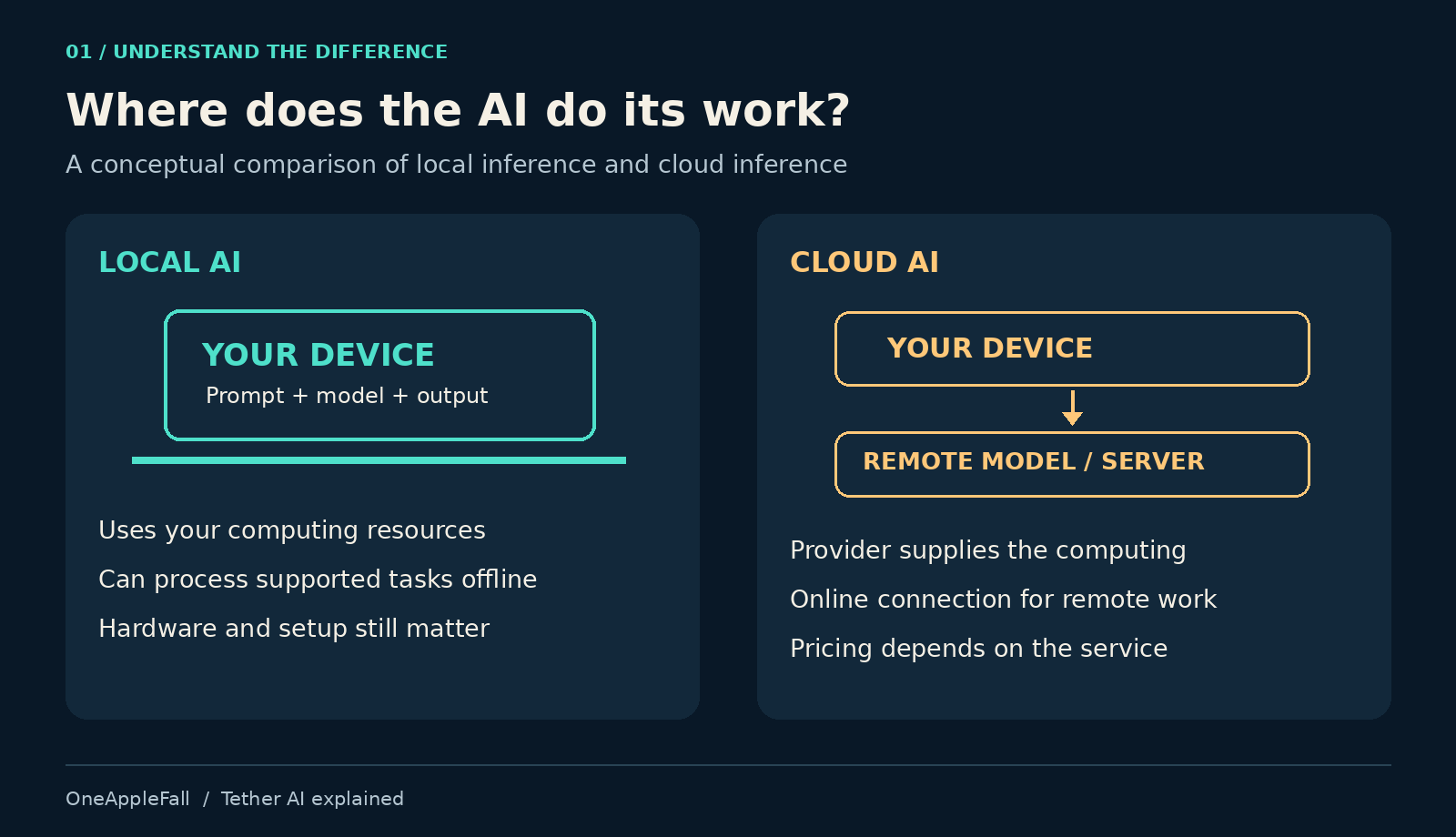
With local inference, the model processes a request using your device’s computing resources. QVAC’s guides describe downloading models and keeping them available locally for subsequent use. [5]
Think of the difference as where the work happens. A cloud service provides remote computing as part of its offering. A local setup uses equipment you supply and manage.
That arrangement can make offline work possible. However, “offline AI” does not mean every connected workflow operates without internet access. Downloading software and models requires a connection unless they are transferred another way. Fetching current information, sending email, or accessing an online business system also requires connectivity.
Before choosing a setup, separate the model’s work from the other services your workflow needs.
What can you do with QVAC?
The official SDK lists capabilities including text generation, document retrieval, transcription, translation, image generation, text-to-speech, and extracting text from scans. It offers JavaScript and Python routes for developers. [6]
Those capabilities suggest several useful starting points.
Writing and rewriting: Try a tightly defined task such as shortening an email or rewriting a paragraph for a particular audience. Judge whether the result preserves the meaning and requires less effort than editing it yourself.
Document work: Test questions with answers you can verify in the source material. A fluent response is not enough; the important question is whether it accurately represents the document.
Transcription: Use an audio sample whose contents you know. Check names, numbers, background noise, and the time needed to correct the transcript.
Translation: Test the actual languages and terminology you use. Good performance on a simple sentence does not establish reliability for a technical document.
Creator tasks: Start with one stage of production, such as drafting an outline or preparing subtitle text. A collection of generation capabilities should not be assumed to deliver a polished, automatically edited video.
These are suggested evaluation tasks, not claims that we have tested QVAC on them.
Can QVAC replace your paid AI tools?
The useful comparison is the complete task you need finished.
If you pay for a tool mainly to rewrite short passages, a local setup may be worth investigating. If your subscription supports an entire team’s research, shared projects, integrations, and production workflow, replacement becomes a much larger exercise.
| Your main requirement | What to evaluate before switching |
|---|---|
| Short drafts and summaries | Accuracy, instruction-following, and editing time |
| Questions about local documents | Retrieval quality and traceability to source passages |
| Repeated transcription | Error rate and correction time on your recordings |
| Coding assistance | Whether suggested changes work and whether tool use is reliable |
| Current web research | How fresh information is retrieved and checked |
| Image or video production | Output quality, processing time, and hardware requirements |
| Background automation | Whether the device remains available and failures are handled |
Tether’s own local-AI guide acknowledges that the models it discusses will not match major cloud assistants on the hardest problems. That is a reason to test task by task rather than assume broad equivalence. [7]
There is also an important economic distinction: moving some work off a subscription does not reduce its bill if you keep paying for the same plan. Count savings only when you can cancel, downgrade, or avoid a real charge.
A limitation worth checking before connecting your favorite tools
QVAC’s documentation describes an HTTP server for tools that support an OpenAI-compatible API, along with dedicated integrations for OpenCode and OpenClaw. This can provide a route to using local models inside an existing workflow. [8]
But the same documentation includes a significant caveat: its compatible chat endpoint currently accepts and returns text only. Non-text content sent through that endpoint is discarded before reaching the model. [8]
That does not mean the entire SDK lacks image or audio capabilities. It means the capabilities of one connection method are narrower than those of the overall platform.
The documentation also warns that some smaller models may fail to invoke tools reliably. [8] An agent that says it searched a file has not necessarily searched it. For automation, inspect the actual actions and outputs.
Is Tether’s QVAC really free?
The SDK product page identifies its license as Apache 2.0 and advertises no per-token bill for local inference. [6] However, the complete cost of using local AI can include:
- Hardware you buy specifically for the workload.
- Electricity consumed during operation.
- Storage for models and files.
- Setup, troubleshooting, and update time.
- Any external services your workflow still calls.
Also check the license of each downloaded model. The software framework’s license does not automatically determine the terms for every model or dataset used with it.
For a broader budgeting framework, see our guide to how much an AI agent costs.
An illustrative break-even calculation
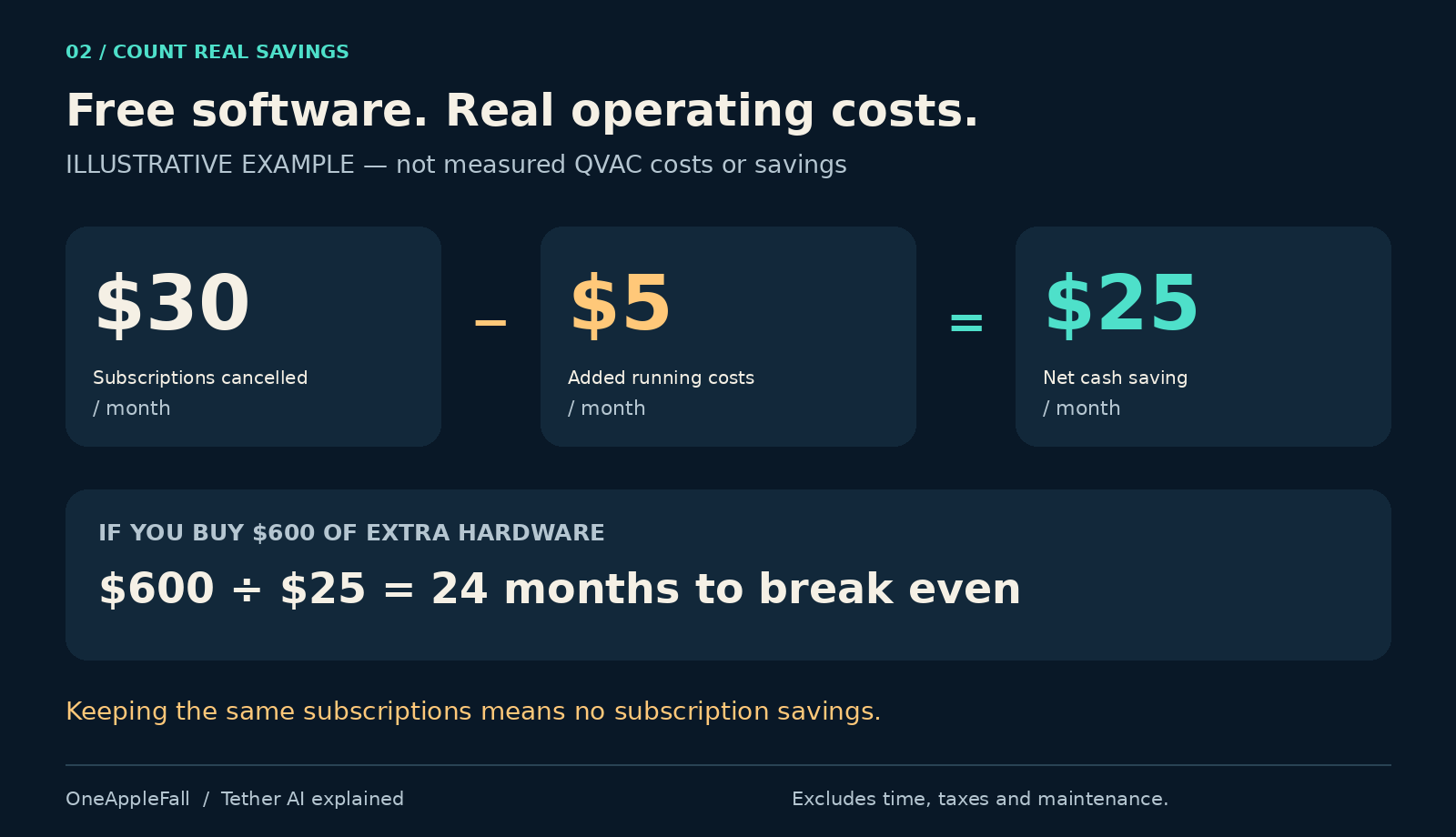
Suppose you cancel $30 of monthly subscriptions but add $5 in monthly operating costs.
Your cash saving would be:
$30 − $5 = $25 per month
If no extra equipment is needed, that is a possible $300 annual saving before valuing your setup time.
If you buy $600 of equipment specifically to make the switch:
$600 ÷ $25 = 24 months to recover the purchase cost
These figures are examples, not measured QVAC expenses or quoted subscription prices. They exclude financing, taxes, maintenance, and the value of your time.
If the subscriptions remain active, there is no subscription saving to offset that purchase.
Will QVAC run on your laptop or phone?
Tether’s hardware guide groups possible workloads broadly around phones and 8 GB laptops, 16 GB laptops, and machines with 32 GB or more. It places selected smaller tasks in the first group and more demanding workloads, including video, in the last. Treat these as vendor guidance, not universal minimum specifications or performance guarantees. [5]
A model fitting into memory does not establish that it runs fast enough for your needs.
Check the exact model, operating system, available memory, graphics support, storage requirement, and intended workload. Your other applications also need resources.
For readers comfortable with the command line, the official guide provides this diagnostic command after installing Node.js:
npx -y @qvac/cli doctorIt reports memory and graphics information. It is a compatibility starting point, not a quality benchmark. [5]
Try your existing hardware first. Buy an upgrade only after you have identified a worthwhile task and a specific bottleneck.
How private is local AI?
Tether presents local processing as a way to keep prompts and files on the user’s device. [1] That can be a meaningful design advantage, but the complete application still matters.
Before using sensitive material, ask:
- Does this particular workflow call an external service?
- Are working files or logs synchronized to cloud storage?
- What permissions does the application have?
- Who can access the device or any exposed local server?
A local model cannot prevent an application from sending information through a separately configured integration.
QVAC’s server documentation recommends authentication when exposing the service beyond the local loopback interface. [8] For ordinary experimentation, avoid making a local AI server publicly accessible.
Privacy should be evaluated across the complete workflow, not inferred solely from the location of the model.
How to get started without cancelling anything prematurely
Start with a small, reversible trial.
- Choose one recurring task. Pick something specific, such as summarizing meeting notes or extracting fields from sample invoices.
- Select a route. Check the official QV.AC assistant page for current availability on your device, or use the developer documentation if you are building an application. Remember the assistant’s Alpha label. [4]
- Check compatibility. Verify requirements for the selected application and model.
- Use non-sensitive samples. Keep initial experiments separate from live business data.
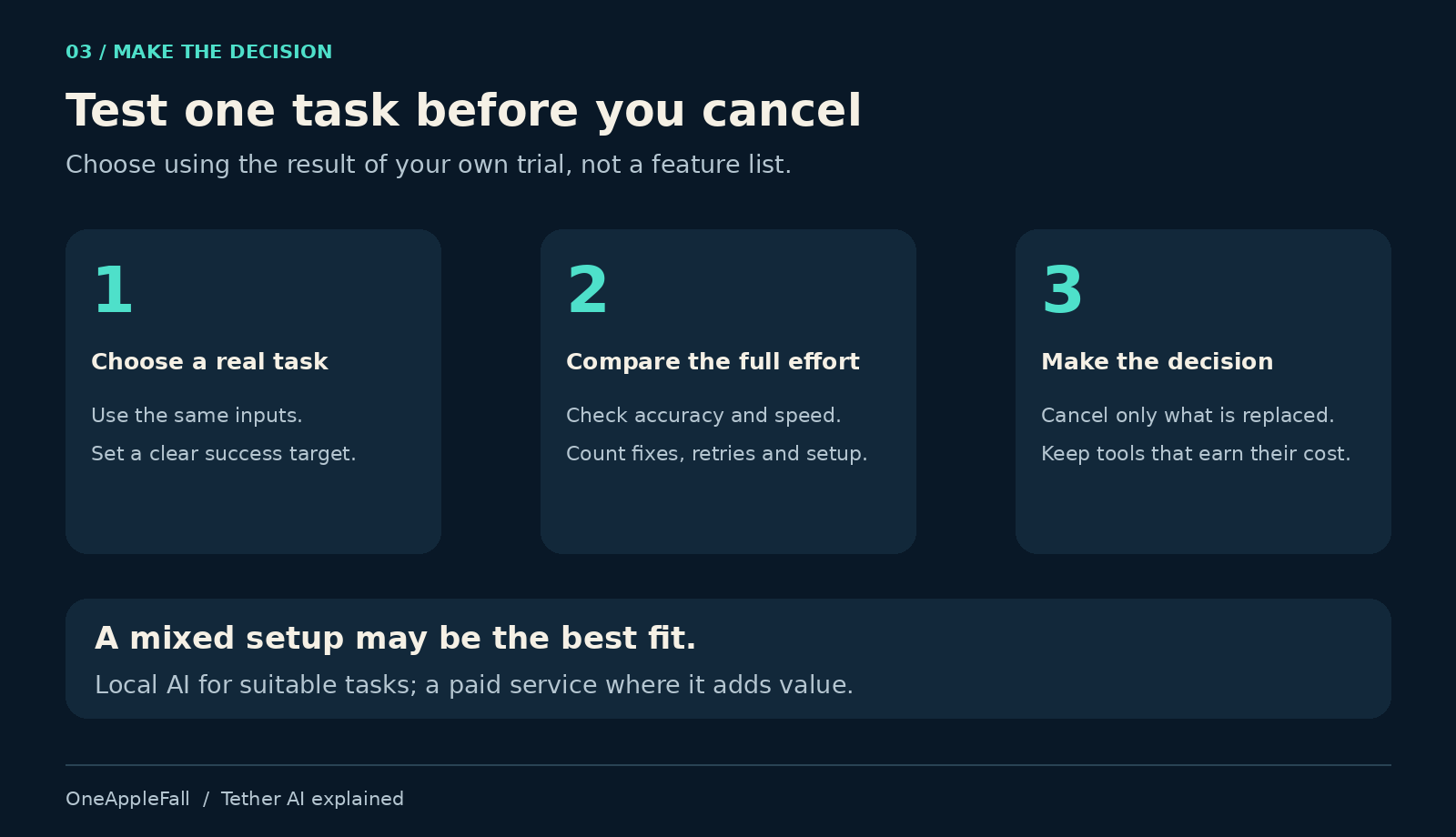
- Run a fair comparison. Give both tools equivalent inputs and requirements.
- Measure total effort. Include waiting, corrections, retries, and setup.
- Decide what you can genuinely stop paying for. Keep any service whose unique benefits you still need.
For a document test, prepare ten questions with known answers. Record correct answers, missing facts, invented claims, and correction time. Save the model name, settings, hardware, and test date so the result remains interpretable.
Ten questions will not establish universal reliability, but they can reveal whether a larger trial is worthwhile.
Should you cancel an AI subscription?
My recommendation is to treat QVAC as a candidate for replacing individual paid tasks first.
It is worth investigating if you already have suitable hardware, repeatedly perform well-defined tasks, and are comfortable managing some setup. A workflow that produces accurate results with little correction could justify cancelling a narrowly used subscription.
Keep your paid service if your trial shows that its convenience, quality, integrations, or reliability save more than it costs.
A mixed arrangement may be the best outcome: local tools for work they handle well, and a paid service for the tasks where it earns its place.
Tether’s free AI push gives users another way to evaluate what they are paying for. The deciding factor is whether your chosen local setup completes your actual work with acceptable effort and cost.
Before the next renewal, test one task you regularly pay AI to do. Let that result decide which subscription stays.
Frequently asked questions
What is Tether AI?
In this article, the term refers to Tether’s AI initiatives, particularly QVAC’s local-AI ecosystem. QVAC includes developer tooling and related applications; it is not one single model. [3]
Does QVAC work offline?
Supported local model tasks can run without a connection after the necessary software and models are available. Features that retrieve online information or interact with external services still require connectivity. [5]
Can QVAC replace a paid chatbot?
Possibly for a particular task, but this article does not establish feature or performance parity. Compare your actual workload before cancelling.
Do I need a powerful graphics card?
Requirements depend on the model and task. Consult the relevant compatibility documentation rather than assuming either that a graphics card is mandatory or that every laptop will perform adequately. [5]
Can beginners use QVAC?
The QV.AC assistant is a user-facing route, while the SDK is intended for building or integrating software. Check current device support and expect possible limitations in the Alpha assistant. [4]
Can I use QVAC commercially?
The SDK is advertised under Apache 2.0. Check its license obligations and separately review the licenses and terms of the models, datasets, applications, and services in your intended setup. [6]