Astra Editor is a free Windows app for video creators. Give it your narrated clips and it builds the edit: speech-timed captions, an opening hook, animated graphics, music and sound effects, rendered to MP4 or exported to Adobe After Effects.
Download Astra Editor 1.3 — Windows, 20 MB
See it in action
The footage in these demos is AI-generated sample material.
What it does
- Speech-timed captions. Local Whisper speech recognition times every word; vertical videos get short caption phrases with the active word highlighted, in seven looks (Classic, Bold Pop, Clean Documentary, Minimal Lower, Boxed Highlight, Gradient Word, Typewriter) or Auto.
- Opening hooks and graphics placed directly on the picture, with faces and areas you mark kept clear.
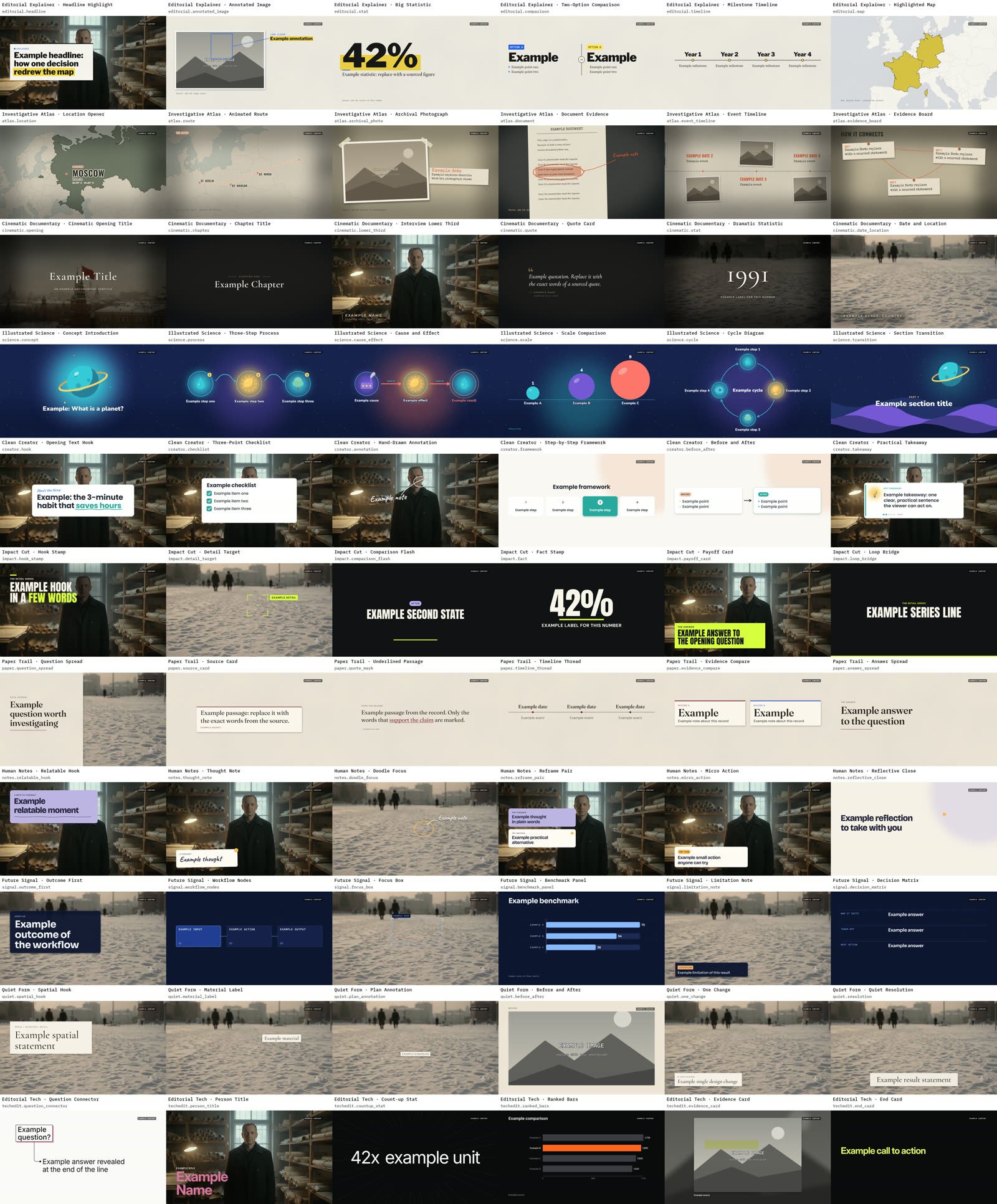
- Eleven graphics themes with 66 animated templates: lower thirds, chapter titles, maps, statistics, timelines, diagrams, quote cards and more. Pick a theme or let it choose one per video.
- Every format from one edit: 9:16, 16:9, 4:5 and 1:1, in 1080p or 4K.
- Music and sound effects: use your own tracks, or generate them with your ElevenLabs key.
- Export a finished MP4, or an After Effects project with the overlays as rendered image sequences.
What you need
- Windows 10 or 11, 64-bit.
- Python 3.12, 64-bit from python.org (the standard installer includes the window toolkit Astra uses).
- An internet connection for the first start, which installs the video and speech libraries (FFmpeg comes with them) and downloads the speech-recognition model and two small detection models.
- Optional: an ElevenLabs API key for generated music and sound effects, and Adobe After Effects for the After Effects export. Rendering uses Intel Quick Sync when your PC has it, and standard encoding when it does not.
Get started
- Install Python 3.12 (64-bit).
- Download the ZIP and extract it into a new folder.
- Double-click START_EDITOR.cmd. The first start sets everything up and takes several minutes; later starts are quick.
- Follow START_HERE.txt in the folder. An example project is included so you can try it straight away.
Good to know
- Your videos are processed on your own PC; they are not uploaded anywhere. Only generating music or sound effects sends a text request to ElevenLabs, using your key.
- Layout choices are rule-based editing, not a vision model that understands the picture. Review the suggested layouts before you render.
- Astra Editor is free and provided as-is, without warranty. It is not affiliated with Adobe or ElevenLabs.
More free tools: AI Tools.