Make small, blurry pictures big and sharp with Max-quality AI. Upscale photos, portraits, anime and digital art up to 8× or 8K, right in your browser: your images are never uploaded.
Upscale image now →- Runs on your device
- No sign-up
- No watermark
- Unlimited & free
Make small images big and sharp
Add an image to see it here. After upscaling, drag the divider to compare and zoom in to check the detail.
See the difference
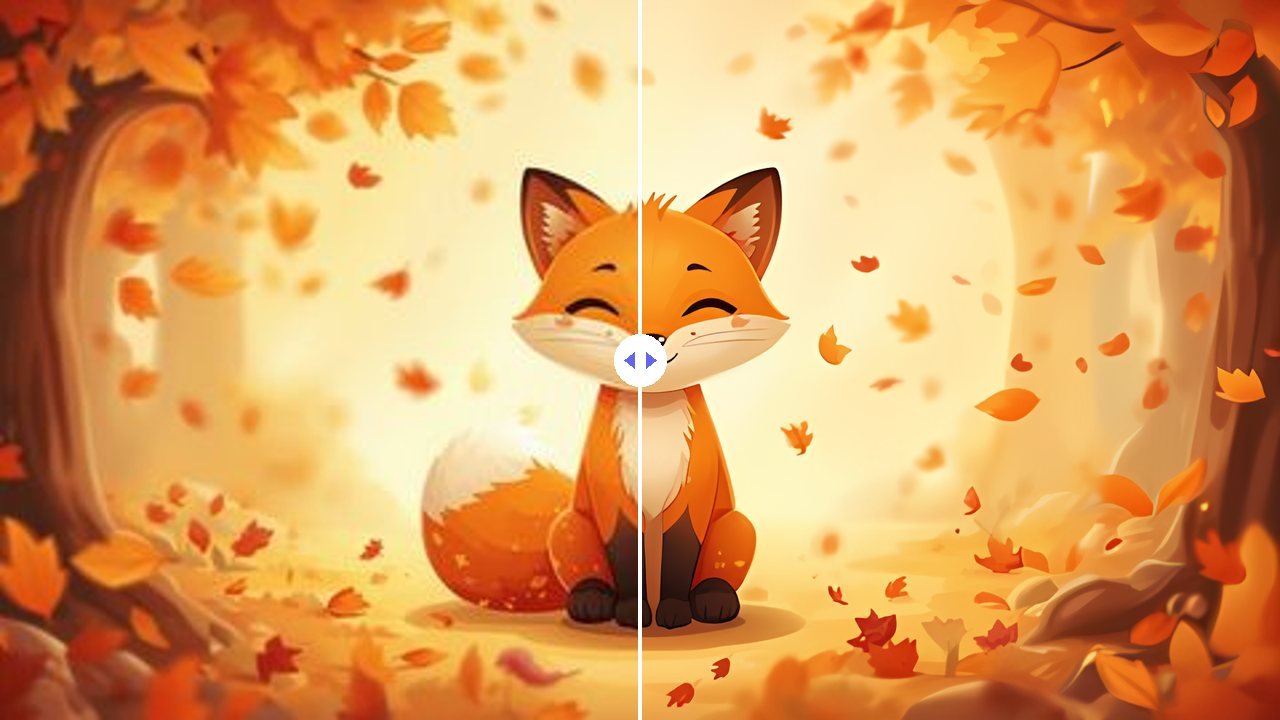
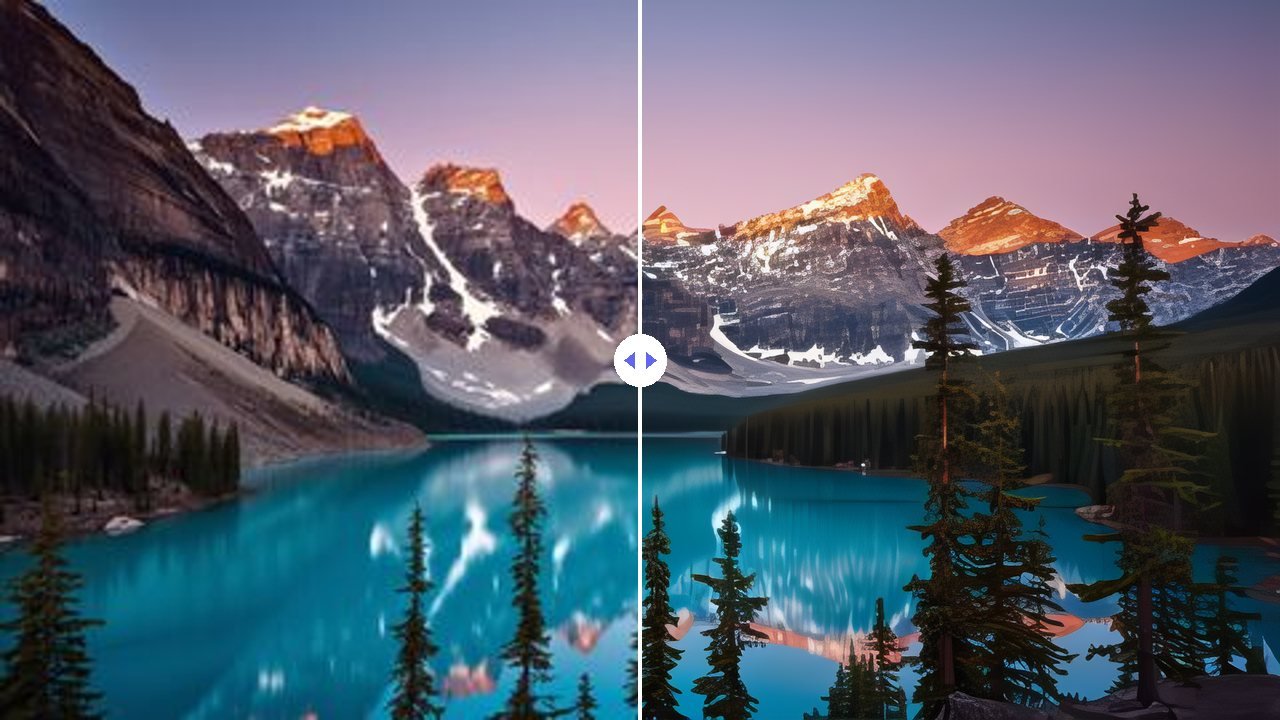
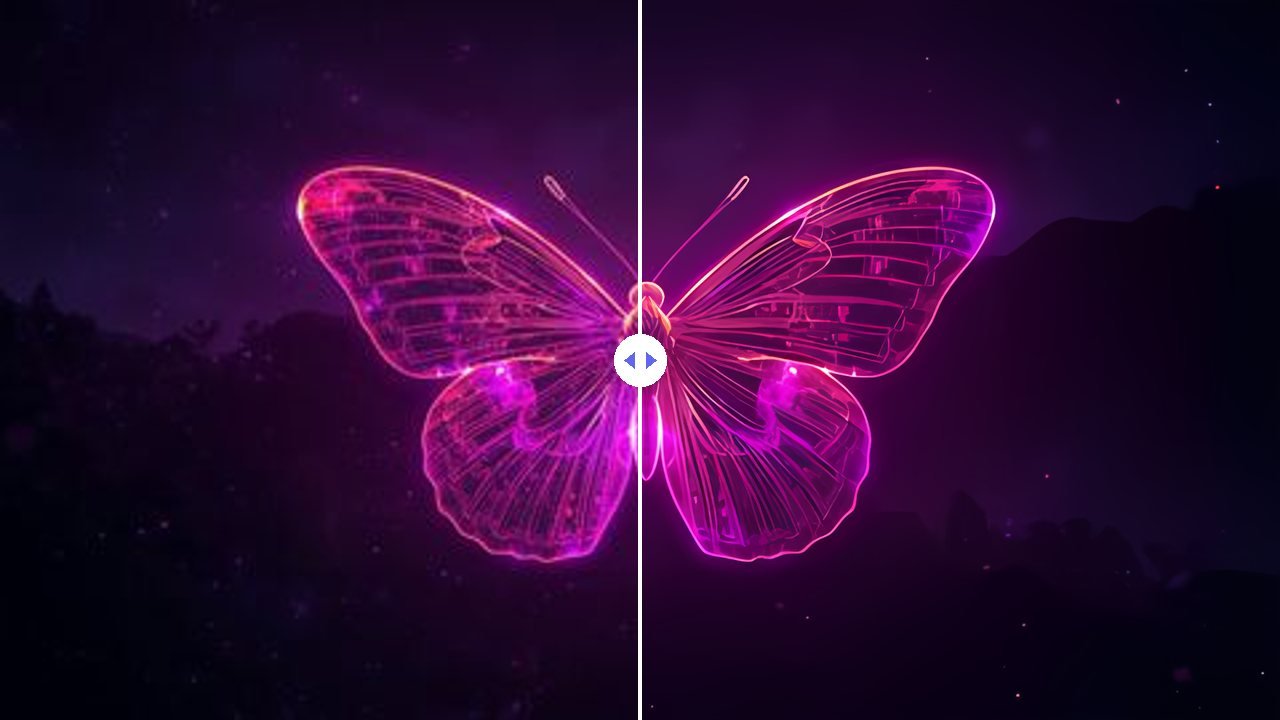
Real results from this tool. Each picture was shrunk to a small 480 × 270 JPG, then enlarged. Drag the slider to compare an ordinary enlargement with the AI result.

 BeforeAI upscaled
Portrait photo
Wrinkles, eyes, hair and the knitted sweater come back sharp instead of soft and blocky.

 BeforeAI upscaled
Landscape photo
Mountain ridges, snow and pine trees regain crisp detail for 4K wallpapers and prints.

 BeforeAI upscaled
Cartoon illustration
Clean outlines and smooth colour with no JPEG noise: ideal for stickers, prints and thumbnails.

 BeforeAI upscaled
Digital art
Fine glowing lines stay sharp and bright instead of turning into a blur.
Demo pictures were created with Canva AI and processed with this upscaler at 4×.
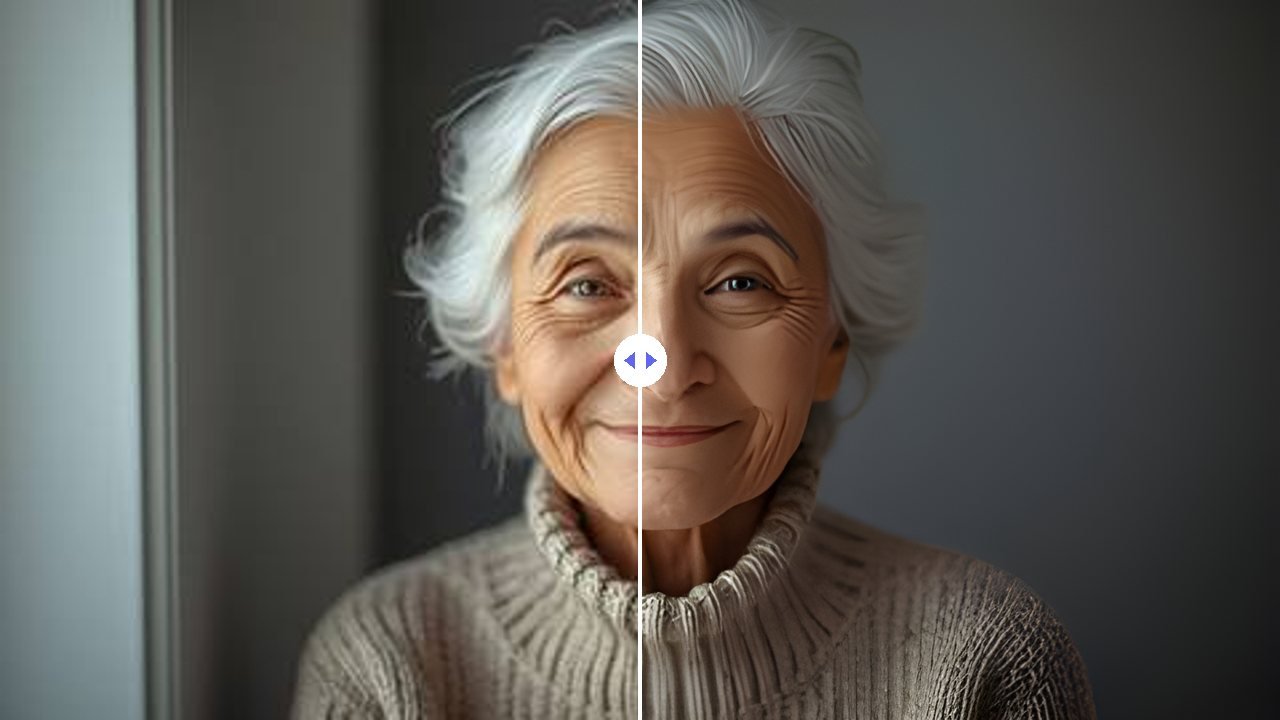
Photo upscaling
Enlarge photos from your phone, old family pictures and small images saved from the web. The Max photo models rebuild real-looking detail and remove JPEG blocks and noise at the same time.
Anime & illustration upscaling
The Art & anime model is trained on drawings, so it keeps lines crisp and colours flat and clean, without the painted look photo models give to artwork.
Upscale to 4K and 8K for print
Turn small images into wallpapers and posters. Every result shows the largest print size at 300 DPI, so you know what will look sharp on paper.
Batch upscale up to 50 images
Add a whole folder of product photos or artwork, pick your settings once and download everything as one ZIP file. No queues, no credits and no waiting for a server.
Why use this image upscaler
Most online upscalers upload your photos and limit free use. This one runs on your own device.
Max-quality AI models
Large ESRGAN models rebuild hair, skin, fur and line art, with a Fast mode when you just need a quick preview.
Private by design
Images never leave your device, so there is nothing to delete from a server and nothing for anyone else to see.
Free and unlimited
No credits, no daily cap, no sign-up and no watermark on your downloads.
Many formats
Open JPG, PNG, WebP, AVIF, BMP and GIF; save as PNG, JPG or WebP and keep transparent backgrounds.
Compare and zoom
Before/after slider, side-by-side view and 100% or 200% zoom with panning to check every detail.
Print guidance
Each result shows its size in inches and centimetres at 300 DPI for photos, posters and products.
How to upscale an image
Three steps, no account.
Add your images
Drop them in, click to choose, or paste a screenshot with Ctrl+V. Up to 50 at a time.
Pick the settings
Photo or Art & anime, Max quality or Fast, then the size (2×, 4×, 8×, 4K or 8K) and the file type.
Compare and download
Drag the divider, zoom to 100%, then download one image or all of them as a ZIP.
Which setting should I use?
Start with Max quality. Switch to Fast for quick previews or older devices.
Photo · Clean
Small, blurry or heavily compressed photos, screenshots and old scans.
Max · 32 MB oncePhoto · Natural detail
Good photos where you want to keep fur, hair, grass and fabric texture.
Max · 32 MB onceArt & anime
Anime, cartoons, illustrations, logos, icons and AI art.
Max · 9 MB onceFast
Quick results on any device, with Low, Medium or High noise reduction for photos.
Fast · 2.5–5 MBWhat size do I need?
| Use | Pixels needed | Suggested setting |
|---|---|---|
| Instagram / Facebook post | 1,080 px wide | 2× for most phone screenshots |
| Etsy, Amazon or Shopify product photo | 2,000 px on the longest side | 2× or 4× |
| 4K wallpaper or video frame | 3,840 × 2,160 px | 4K |
| Print 8 × 10 in at 300 DPI | 2,400 × 3,000 px | 4× from a small image |
| Large poster | 7,000 px or more | 8K (desktop computer recommended) |
Who uses it
A handy tool for anyone who works with pictures.
Online sellers
Meet Etsy, Amazon and Shopify image-size rules without reshooting products.
Families
Enlarge old and small family photos before printing or framing them.
Designers & AI artists
Upscale Midjourney, DALL·E and Canva art for prints, posters and merch.
YouTubers & bloggers
Make thumbnails, featured images and social posts crisp on any screen.
Gamers & anime fans
Turn screenshots and fan art into sharp 4K and 8K wallpapers.
Students & teachers
Sharpen images for slides, posters, reports and school projects.
How it compares
Based on what each site states (checked October 2026).
| Tool | Free use | Sign-up needed | Your image | Batch | Sizes |
|---|---|---|---|---|---|
| OneAppleFall | Unlimited | No | Never uploaded (runs on your device) | Yes, free (50 at a time, ZIP) | 2×, 4×, 8×, 4K, 8K |
| imageupscaler.com | 5 credits, then sign-up / plans | For more credits | Uploaded; deleted after 60 min | Yes | Up to 4× |
| ImgUpscaler | Free tier (limits not stated) | Has accounts | Uploaded; deleted within 24 h | Paid plans | 2×, 4× |
| Pixelcut | 3 downloads a day | For Pro | Uploaded; deleted within 24 h | Pro | 4×, 8×, up to 16K |
| Adobe Firefly | Daily free credits | Yes (Adobe ID) | Uploaded to Adobe | One file at a time | 2×, 4× |
Cloud tools can offer things a browser can’t, such as 16K output, face restoration or video upscaling, and they are faster on weak devices. If privacy, unlimited free use and no sign-up matter more to you, an on-device upscaler is the better fit.
Frequently asked questions
Everything you need to know about the AI Image Upscaler.
01Is this image upscaler really free and unlimited?
Yes. There are no credits, no daily limit, no watermark and no account. The page is supported by ads.
02Are my images uploaded?
No. The AI model downloads to your browser once and your images are processed on your own device. Nothing is sent to a server, so there is nothing to delete afterwards.
03What is the difference between Max quality and Fast?
Max quality uses large ESRGAN models (16.7 million parameters) that rebuild far more detail: hair, fur, skin texture, fabric and clean line art. Fast uses a much smaller model that finishes in seconds but adds less detail. Max downloads 32 MB once (9 MB for Art & anime) and keeps it on your device; Fast downloads 5 MB.
04Clean or Natural detail: which photo style should I pick?
Clean is best for small, blurry or heavily compressed images: it removes JPEG blocks and noise and gives smooth, sharp results. Natural detail is best for decent photos where you want to keep fine texture such as fur, hair, grass and fabric.
05Can I upscale an image to 4K or 8K?
Yes. Choose 4K or 8K and the longest side is fitted to 3,840 or 7,680 pixels. 8K results need a computer with plenty of memory; on phones and smaller devices the tool limits the result to 4,096 pixels and tells you.
06Does it fix blurry images?
It sharpens blur from low resolution, noise and compression very well. It can’t recover detail that was never captured, such as a face that is only a few pixels wide or heavy motion blur.
07Why does Max quality take longer?
The Max models do about 15 times more work per pixel than Fast. On a recent laptop with a graphics chip a small photo takes seconds; on older computers it can take a minute or more, and the tool shows the time left. Very large photos are worked on at a reduced size so they finish in reasonable time, and the result tells you when that happened.
08Which browser works best?
Chrome or Edge on a computer, which support WebGPU graphics acceleration. Other browsers work too but start in Fast mode, because the big models would be slow without WebGPU.
09Can I upscale several images at once?
Yes. Add up to 50 images, upscale them in one go, and download them all as a ZIP file.
10Does it keep transparent backgrounds?
Yes, when you save as PNG or WebP with “Keep transparency” ticked. JPG has no transparency, so transparent areas become white.
11Can I use the upscaled images commercially?
Yes. The results are your images; you need the rights to the original image you upscale. The AI models are released under the BSD 3-Clause and CC BY 4.0 licences, which allow commercial use.
12Is AI upscaling better than normal resizing?
Yes for enlarging. Normal resizing stretches existing pixels, so edges look soft and compression blocks get bigger. The AI models were trained on real photos and artwork to rebuild sharp edges and clean texture.