
Researched October 13, 2026
AI-generated conceptual illustration; not an actual Cybercab interior or Grok interface.
You have 20 minutes before your next meeting. Your inbox contains a client request, your calendar has a conflict, and a document still needs your attention.
An AI assistant could explain how to organize that work. An AI agent promises to open the relevant tools and help complete it.
That is why Grok Bot’s arrival in Tesla’s Cybercab matters beyond car news. It brings a practical question into a new setting: when you delegate a task to AI, how much work actually disappears—and how much returns as checking, corrections, and approvals?
For creators, freelancers, and small-business owners, the answer matters more than the screen on which the assistant appears.
Quick answer: Tesla documents Grok Bot as an option for multistep tasks such as ordering coffee or making a reservation. The broader Grok Bot product works with connected tools and a persistent cloud computer. Neither description establishes that every request will succeed, that access is universal, or that the assistant operates the vehicle’s driving system. [1][2]
This is a researched explainer, not a hands-on Cybercab review. Product facts are attributed to official documentation; example prompts and evaluation methods are our suggestions, not tested performance claims.
What changed—and what remains unproven?
October coverage reported Grok Bot activation in Cybercab and Model Y vehicles, citing Tesla engineer Yun-Ta Tsai. That is rollout reporting, not a controlled test of success rates or time savings. [3]
Tesla’s own support page now describes an in-vehicle experience that combines Grok, connected services, and delegation to Grok Bot. It is the more useful source for checking requirements than assuming a fleet announcement applies to every Tesla owner. [1]
The key questions separate neatly:
| Question | Evidence available | What not to assume |
|---|---|---|
| Can Grok Bot undertake multistep digital work? | Official product documentation describes that capability. | Every website and task works reliably. |
| Has in-car availability been reported? | Rollout coverage cites a Tesla engineer; Tesla documents in-car Bot use. | Every account, region, vehicle, and subscription is eligible. |
| Does it save a predictable amount of time? | No controlled benchmark was established in this research. | A trip’s full duration becomes productive time. |
| Is it better than using an agent on a phone? | That needs a like-for-like comparison. | A built-in screen creates an automatic advantage. |
For buyers, a documented capability is a starting point. A demonstrated benefit on their own workload is the stronger evidence.
Grok, Connectors, and Grok Bot are different layers
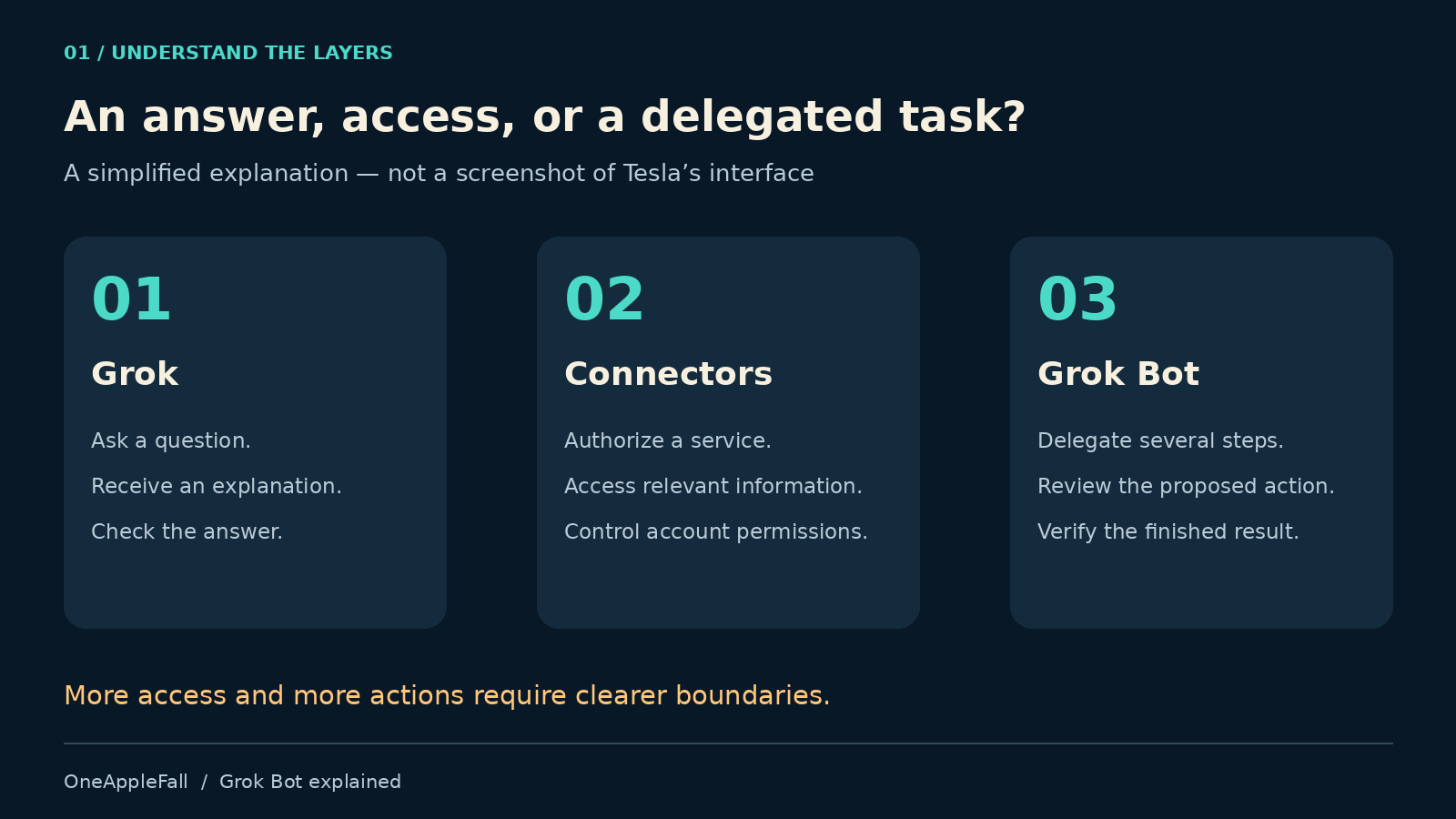
Tesla describes ordinary Grok interactions, Connectors for services such as Gmail and Google Calendar, and Grok Bot for more involved tasks. [1]
A simple way to evaluate those layers is to ask what the system must access and change.
“Explain how to write a follow-up email” needs an answer. “Find yesterday’s client email” needs authorized access to a source. “Draft a reply, attach the correct document, and prepare it for approval” requires coordinated work across several steps.
That last request has more opportunities to go wrong. The agent must identify the right conversation, select the current document, understand the request, and respect the boundary between drafting and sending.
The meaningful distinction is the scope of the delegated work, rather than whether you typed it or spoke it.
Where does Grok Bot do the work?
Official Grok Bot documentation describes a persistent cloud computer with a browser, files, and command-line tools. Bots can use connectors and interact with websites, while work can continue after the user closes their laptop. [2]
That makes the vehicle one way to reach the agent—not evidence that all computation or connected-account data stays inside the car.
The computer documentation also says Bots on the same account share files and signed-in browser sessions. Separate Bot names should therefore not be treated as isolated workspaces for confidential clients. [4]
For a business user, the practical question becomes: which accounts should this workspace be allowed to access? Start with the minimum needed for the task you are evaluating.
Who can use it, and what does it cost?
For owner vehicles, Tesla lists an AMD processor, software 2025.26 or later, and Premium Connectivity or Wi-Fi for Grok. Connectors and Bot require software 2026.26 or later and sign-in; Bot additionally requires SuperGrok and setup of the linked Bot account. [1]
Those are owner-vehicle requirements, not a complete Cybercab passenger onboarding guide. Check the current ride interface and official instructions for your account rather than transferring steering-wheel or owner-settings instructions to a driverless taxi.
The general Grok Bot product page lists eligible plans, included weekly usage, and additional usage charged by token cost. Do not assume every general-product entitlement also unlocks Tesla integration: Tesla specifies its own requirement. [5]
When estimating value, consider three separate amounts:
- Access cost: the subscription or plan needed for your intended setup.
- Usage cost: any additional charges incurred by delegated work.
- Completion cost: your time spent checking, correcting, and finishing results.
Your transportation fare is another expense if you are taking a ride. An agent subscription should not be assumed to include it.
Our guide to AI-agent costs explains why subscriptions alone do not describe the full operating budget.
Four useful workflows to evaluate
These are proposed trials for an appropriately configured agent. They are not claims that we completed them inside a Cybercab.
1. Prepare a meeting brief
Try this request:
Find my next client meeting and the latest related email thread. Prepare a short brief covering the purpose, outstanding questions, and documents I should read. Link to each source. Do not edit my calendar or send anything.
The result is useful only if it identifies the correct meeting and distinguishes current facts from old discussion. Check names, dates, commitments, and document versions.
The finish line is a brief you can trust after a quick review, not a convincing paragraph that forces you to reopen every source.
2. Prepare client replies without sending them
Find unread messages from existing clients received today. Draft replies for messages that need an answer. Flag missing information. Do not send, archive, delete, or change anything in the account.
Decide in advance what “existing client” means. If the agent has no reliable client list, provide one or ask it to mark uncertain matches.
A draft that invents a delivery date or promises an unapproved discount creates more work than it saves.
3. Build a source-backed content brief
Research this AI-tool announcement using its official documentation. Separate available features from announced plans, record access requirements, and create a comparison outline with source links. Do not publish.
For a website owner, this is more valuable than requesting a generic article. The task produces material an editor can inspect: sources, claims, limitations, and open questions.
Check whether each link actually supports the nearby statement. Several articles repeating one announcement are not several independent tests.
4. Compare a purchase before authorizing it
Find the exact accessory on this list. Compare total delivered prices from three sellers. Show the product identifiers, delivery dates, return conditions, and final totals. Stop before checkout.
Keep comparison and purchase as separate decisions. An attractive price can hide the wrong model, a different quantity, or a delivery date that makes the purchase useless.
This trial also exposes whether the agent can recognize uncertainty instead of silently choosing a substitute.
A coffee order shows why completion is harder than conversation
Consider a hypothetical request to order a regular drink near a destination.
For the request to succeed, the agent needs more than the drink’s name. It must identify a suitable branch, distinguish pickup from delivery, check the total price, and know whether the user has authorized payment.
Then there is the trip itself. Ordering something successfully does not establish that the vehicle will stop at the collection point.
Tesla’s Robotaxi support page treats route changes separately and currently says additional stops cannot be added. Riders should check the current trip controls rather than assume an errand automatically modifies the ride. [6]
That separation is an important lesson for any automation system: success in one application does not mean the whole real-world task is complete.
Privacy and approval: what the documentation answers
Grok Bot’s security guidance recommends explicit boundaries for sending messages, publishing, purchases, transfers, deletion, and other consequential actions. It describes approval controls and warns that model-based automatic review is not a substitute for restricted access. [7]
Use a narrow instruction such as “prepare the booking details and ask before confirming” rather than “handle everything.” Inspect the proposed recipient, amount, and target before approving.
The same documentation says deleting a Bot does not remove shared-computer files or browser sessions. Removing access may also require signing out, revoking connectors, and pausing routines. [7]
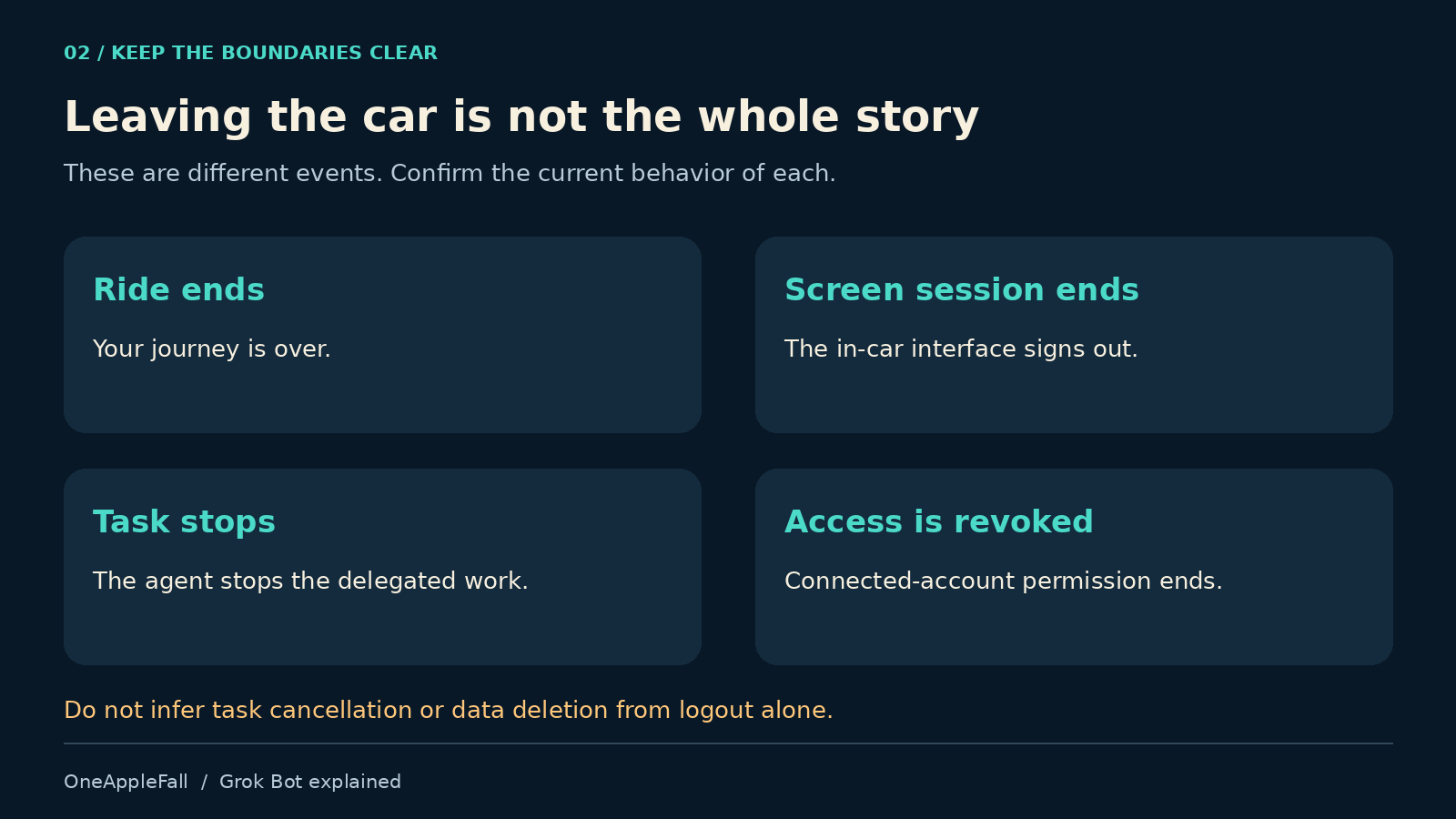
Ending a car ride, ending a screen session, stopping a task, and revoking account access are different events. We did not establish the complete Cybercab-specific behavior for all four. Do not infer cloud-data deletion or task cancellation from an automatic screen logout.
Before using a shared vehicle for confidential work, verify what remains visible, which task continues, and where any subsequent approval appears. Those are product questions that deserve specific answers.
Does the car give Grok Bot an advantage over a phone?
An integrated interface could make it easier to start a task without switching between applications. But the general Bot product also offers mobile and desktop access. [5]
For that reason, the fair comparison is an integrated car experience against an agent on your phone during the same journey—not against doing everything manually after arriving.
Our proposed comparison would hold the task, account access, and desired result constant, then measure:
| Measure | What to record |
|---|---|
| Startup effort | Time from deciding to delegate to the agent actually beginning |
| Voice corrections | Misheard names, dates, amounts, and instructions |
| Approval friction | How easily the user can inspect and approve a proposed action |
| Accuracy | Correct results verified against the original sources |
| Recovery | What happens after a failed login, interruption, or changed instruction |
| Handoff | Whether unfinished work can be resumed clearly after arrival |
The integrated experience wins only if it improves outcomes or reduces effort. Being built into the car is a distribution advantage; user benefit still needs measurement.
How to measure time saved without fooling yourself
Use this simple model:
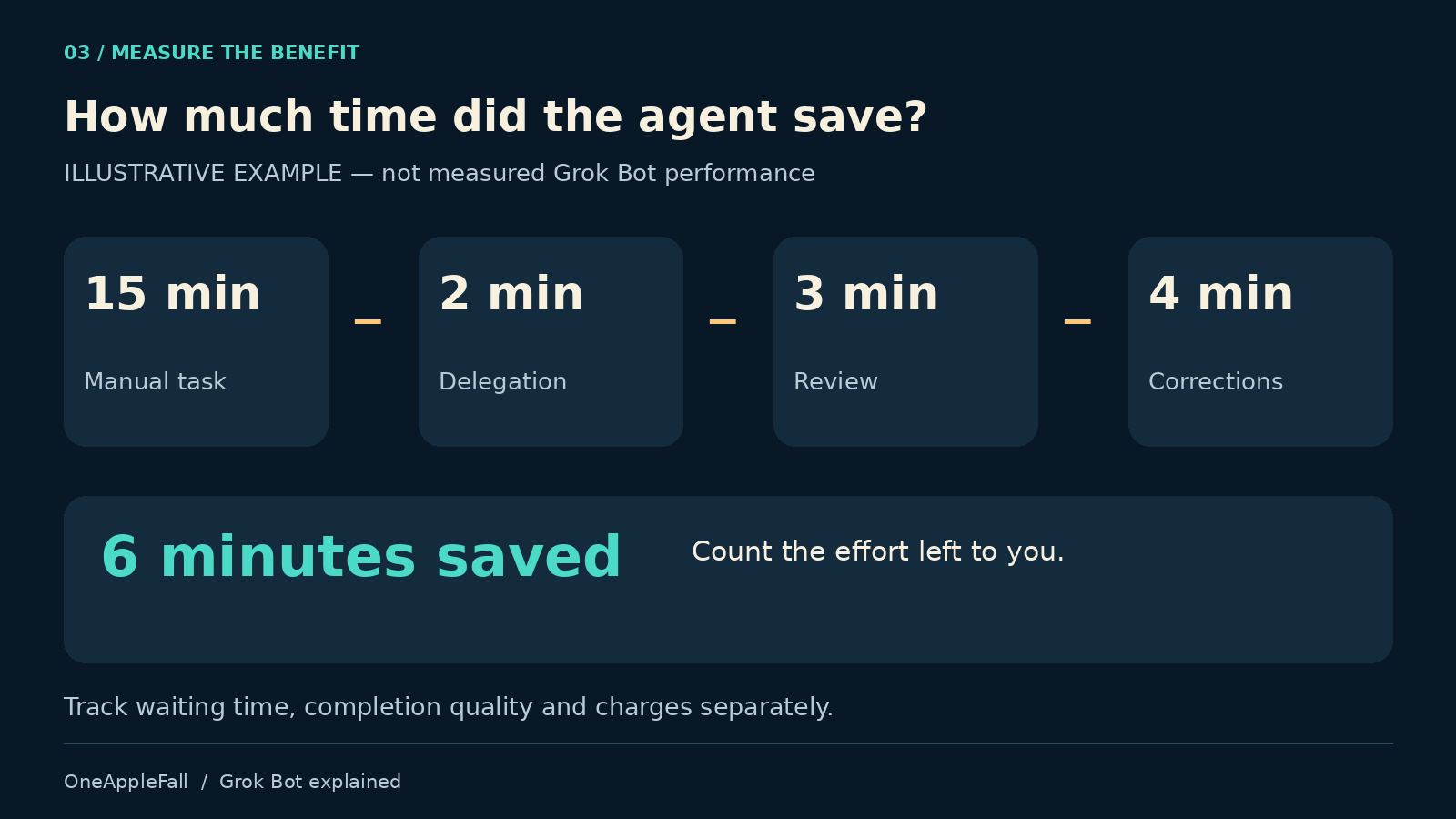
Net hands-on time saved = manual task time − delegation time − review time − correction time
Suppose a task normally takes 15 minutes. Delegating takes two minutes, checking takes three, and corrections take four. The saving is six minutes—not 15.
That is an illustrative example, not a Grok Bot result. Track waiting time separately, because a task can require little attention yet miss its deadline.
For a small initial evaluation, try ten comparable tasks and record:
- How many were completed correctly.
- How many required intervention.
- Total hands-on minutes saved or lost.
- Charges incurred.
- Any action outside the requested scope.
A small trial cannot establish reliability across every scenario, but it can reveal whether a larger rollout is justified. Check the repeated results, including failures, before relying on the workflow.
What this means for creators and small businesses
The transferable idea is that an agent can be reached from several places while continuing work in the tools where the result belongs.
For a creator, that might mean preparing a research brief before editing begins. For a small business, it could mean assembling tomorrow’s meeting materials or drafting customer responses.
You do not need to make a vehicle purchase to investigate those possibilities. Evaluate the general agent on a task you already perform, subject to its availability and plan requirements.
Also remember that a conversational agent is not necessary for every job. A predictable trigger and a fixed sequence of steps may be easier to maintain as an ordinary automation. Use an agent when interpreting changing information adds real value.
Verdict: judge the finished work
Grok Bot in Cybercab is an interesting example of AI moving into the places where people already spend time. Its appeal is understandable: describe the work, then continue your journey while the system attempts it.
For OneAppleFall readers, the useful next step is practical. Pick one recurring task, define what a correct result looks like, restrict the agent’s access, and measure the effort left to you.
The meaningful milestone is a task completed correctly, within the permitted scope, at an acceptable cost. A confident voice and a polished screen are not enough to establish that.
Frequently asked questions
Is Grok Bot the system that drives Cybercab?
This article concerns the digital-task assistant. Its ability to handle apps, documents, or purchases should not be treated as evidence about autonomous-driving performance.
Do I need a Tesla to use Grok Bot?
No. The general product has desktop and mobile access. In-car integration is a separate access route with its own requirements. [5]
Will every website work?
No universal compatibility is established. Official documentation notes that some websites expire sessions, ask for verification again, or require a human step. [4]
Should I start with banking or payments?
Our recommendation is to begin with read-only tasks and drafts. Establish reliability and understand permissions before considering any workflow that spends money or changes financial records.
Can I assume it stops when I leave the vehicle?
No. Confirm the current Cybercab-specific behavior. The broader product uses persistent cloud work, so a vehicle logout should not be assumed to cancel every task or revoke connected accounts. [2]